Claude Code: a herdr plugin that tells me which agent needs me
I run several Claude Code agents at once. herdr makes that painless. It's a terminal-native agent multiplexer, like tmux but it knows which panes are running agents and lists them in a sidebar. Spinning up five of them is easy. The hard part is knowing which one needs me right now.
They all sit in the sidebar churning, so I'd tab through them one by one looking for the pane that had been stuck on a question for ten minutes while I babysat a different one. The supervising got more expensive than the work.
What herdr already shows
herdr detects an agent's status on its own and puts it in the sidebar: working, idle, blocked, done. Useful, but coarse for triage:
blockeddoesn't say whether the agent is waiting on CI or waiting on me.idleanddonelook about the same when you're scanning fast.- None of it tells you how long. The pane that's needed you for eight minutes looks identical to the one that stopped five seconds ago.
So when I glance at the sidebar, two questions go unanswered: what is this pane actually doing, and how long has it been doing it.
What the plugin adds
An icon and a live timer per agent pane. The icon disambiguates the stopped states; the timer counts how long the pane has held the current one.
| icon | meaning |
|---|---|
| ⚡ | working |
| 🔁 | looping (running /loop) |
| ⏳ | waiting on something automated: CI, a build, a deploy |
| ✋ | stopped, needs me: a question, a decision, an approval |
| ✅ | done, nothing left |
| 💤 | idle at its prompt box |
| 💀 | stale: hasn't moved in over a day |
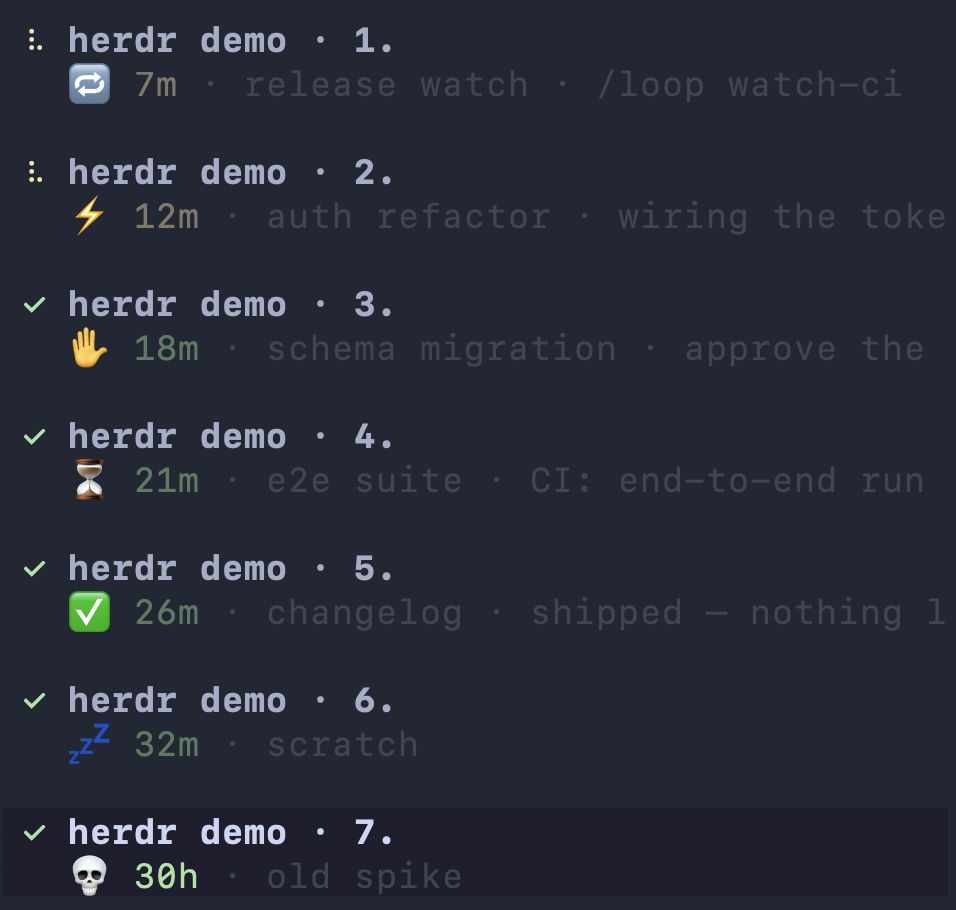
So a pane reads ✋ 8m: it's wanted me for eight minutes. I scan the sidebar, find the oldest ✋, and go there. Triage instead of polling.
How it knows: the agent reports itself
herdr can tell that a pane stopped. It can't tell why it stopped — but the agent knows why. So the interesting half of this is just a convention I gave Claude, dropped into my global CLAUDE.md so every session picks it up:
## herdr session status

Call the `herdr-status` helper as your activity changes, to tell the user
what you're doing — above all when you need something from them:

- `herdr-status input`   — ✋ you need me before you can continue
- `herdr-status done`    — ✅ finished, nothing left
- `herdr-status waiting` — ⏳ blocked on something automated (CI, a build)
- `herdr-status looping` — 🔁 working in a loop
- `herdr-status working` — ⚡ back to plain progress

End every turn with `done` or `input` — never leave me guessing which.
That last line does most of the work. End on input and the pane shows ✋ the instant it stops; end on done and it shows ✅. The sidebar always tells me whether a stopped pane is blocked on me or genuinely finished, without my opening it.
The states release on their own. waiting, input, and done clear the moment the agent starts working again, while working and looping stick until it stops. A pane that says ⏳ flips back to ⚡ by itself once CI comes back and Claude resumes.
How it knows: a daemon fills the gaps
The self-reports cover intent — why a pane stopped. herdr already tracks the coarse state of every pane on its own, idle included (sitting at the prompt), so the plugin never has to scrape output to notice an idle pane; it just renders 💤 for the state herdr already reports. What's left is the time. A small background daemon covers the gaps between events: every tick it advances the timer and drops panes that have gone away.
herdr exposes the plumbing for both halves. A plugin hook fires on the lifecycle transitions (pane.agent_detected, pane.agent_status_changed) and pushes an update the instant a pane changes state; the daemon polls herdr pane list on a timer for everything that isn't an event — no socket subscription, no output scraping. The display rides in two herdr metadata slots: the icon and timer share one as a single ⚡ 6m string (herdr swaps the icon per detected state), and the self-reported detail goes in the other, so a pane can read ⚡ 6m fixing the parser. The plugin and daemon write to a shared state file so they never disagree about a pane.
I won't paste the whole thing; it's a few hundred lines of bash and Python. But that's the shape of it, and none of it is exotic.
A small bonus: renaming panes
herdr labels a pane by its repo or folder by default. When three panes live in the same repo doing different things, that label is useless. One more helper fixes it:
herdr-status-rename "auth refactor"
I wired that into CLAUDE.md too, so an agent renames its own pane when its task changes. The sidebar stops being three identical repo names and starts telling me who's doing what.
The result
The agents got cheap to run in parallel long before they got easy to supervise. This closes the gap. The sidebar went from a list of panes I opened one by one into a board I read at a glance, and the only pane I open now is the one with the oldest ✋.
- 1. Claude Code: switching between multiple accounts
- 2. Claude Code: a thin script that beat the MCP by ~7x on tokens
- 3. Claude Code: automating my support rotation
- 4. Claude Code: line up your session windows
- 5. Claude Code: a herdr plugin that tells me which agent needs me
- 6. Claude Code: fuzzy-search every session you've ever had