Claude Code: fuzzy-search every session you've ever had
Two weeks ago Claude and I worked out why our staging deploys were flaky. Today it's happening again, and the answer is sitting in some session transcript on my disk. Which one? No idea. I remember a phrase from the conversation, not a session title.
Claude Code's own picker doesn't help here. claude --resume lists recent sessions for the current project, by title. If the title doesn't ring a bell, you're done. The transcripts themselves are JSONL files under ~/.claude/projects/, so the fallback is grepping JSON-encoded lines by hand and copy-pasting session ids into --resume. I did that maybe three times before deciding it was a tooling problem.
The palette
I run my agents inside herdr (the terminal-native agent multiplexer from the previous post), so I built the fix as a herdr plugin: herdr-agent-palette. Press a key, type what you remember, land where it was said. It fuzzy-searches your live panes and their scrollback too, but the section that fixed this particular pain is sessions: every Claude Code session on disk, searched by full transcript content. Not titles. Content.
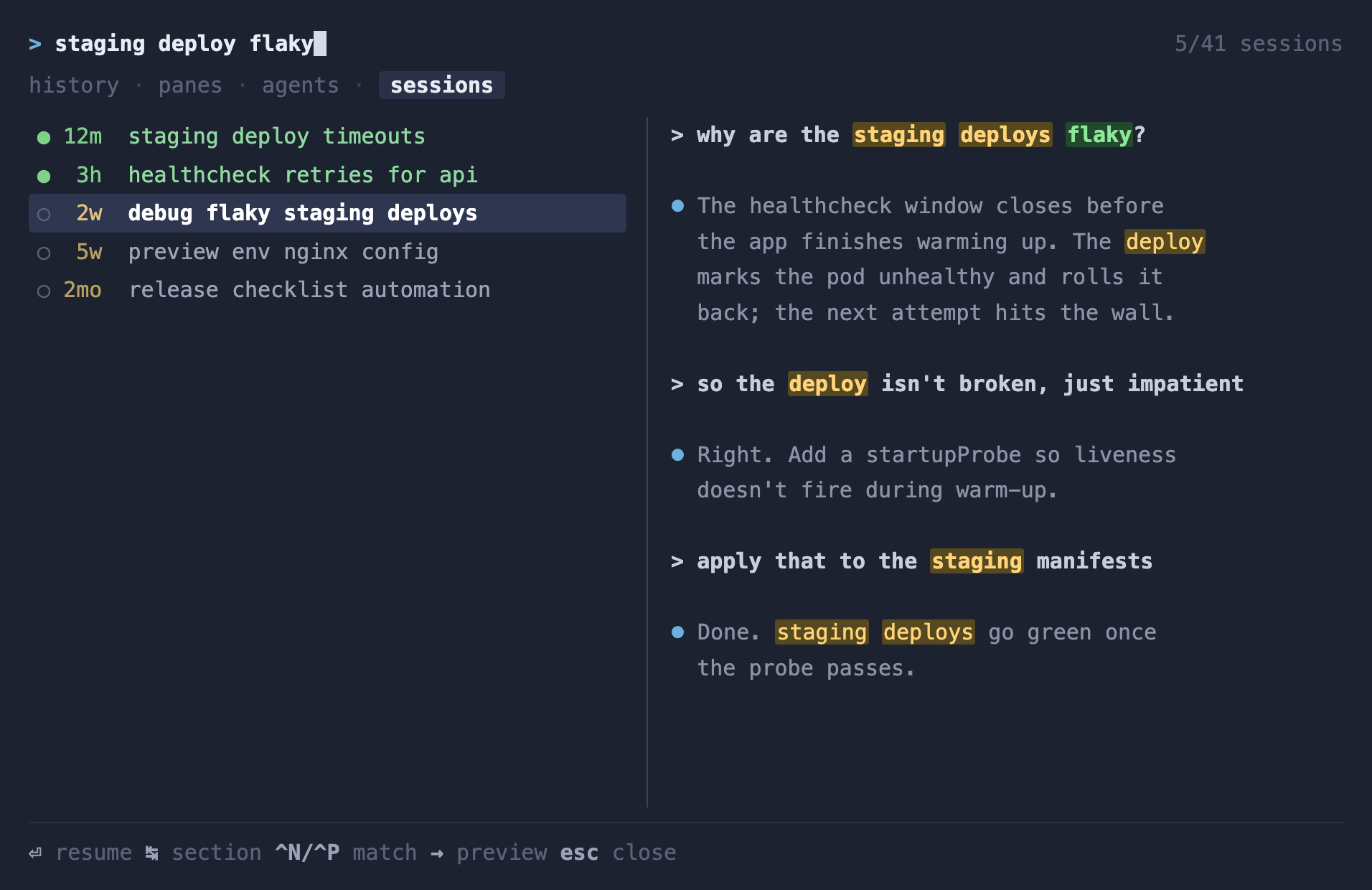
Each row leads with how long since the session last moved and whether it's still open (●) or already closed (○); the preview shows the conversation with the query highlighted. Enter jumps to an open session's pane, and resumes a closed one in a fresh workspace, cwd set to where it ran. So: type staging deploy flaky, hit Enter, and ask the two-week-old session "that deploy fix, apply it here too".
That last part is what changed how I use it. Old sessions stopped being an archive I dig through and became something I casually jump back into.
It's a self-contained curses TUI, Python standard library only, with a clean-room fzy-style matcher that folds diacritics (Matejcek matches Matějček, which matters more than you'd think in a Czech codebase). Install is one command; the keybinding and the resume-command override (useful if you run multiple accounts) are in the README.
The transcripts were on disk all along. All they were missing was a search box.
- 1. Claude Code: switching between multiple accounts
- 2. Claude Code: a thin script that beat the MCP by ~7x on tokens
- 3. Claude Code: automating my support rotation
- 4. Claude Code: line up your session windows
- 5. Claude Code: a herdr plugin that tells me which agent needs me
- 6. Claude Code: fuzzy-search every session you've ever had